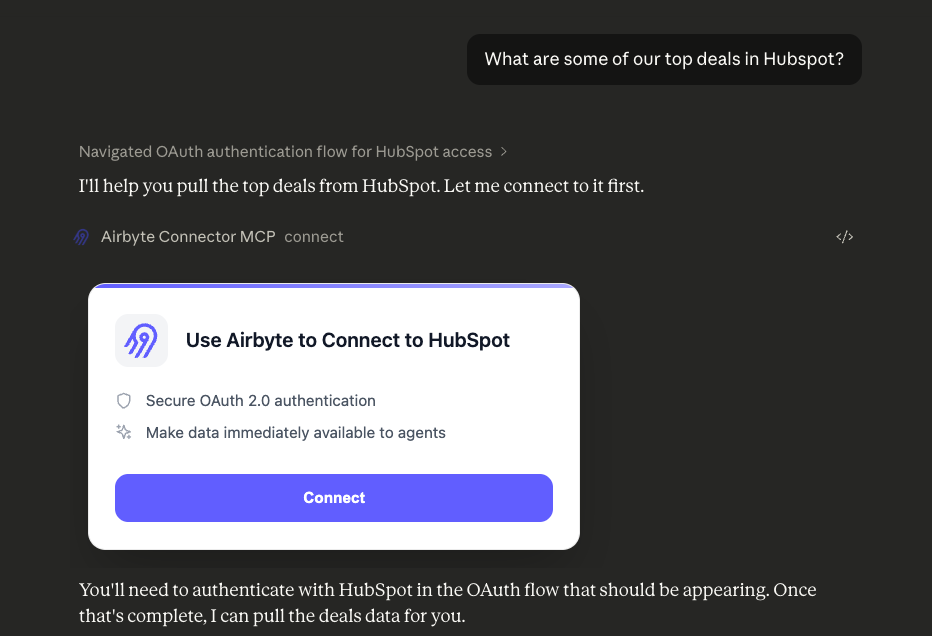
MCP Apps are a newly released extension to the Model Context Protocol that lets MCP tools return interactive HTML interfaces instead of plain text. MCP Apps enable interactive UIs directly in agentic chat, rendering directly in the conversation within Claude, ChatGPT, and other MCP clients . The value: users can interact with complex interfaces without leaving the chat context.
We wanted to test this capability at scale, so we built OAuth flows for Airbyte’s agent connectors (Asana, HubSpot, Slack, and more). OAuth seemed like the perfect stress test: it requires user interaction, state management, and external redirects. Here's what we learned about building production MCP Apps.
Why OAuth Flows Make a Good Test Case Agents need access to external data sources. Your sales copilot needs HubSpot contacts. Your support agent needs Zendesk tickets. Your engineering assistant needs Linear issues. Most integrations require OAuth . Building this is complicated, as it requires connector-specific state management, redirect flows, OAuth app provisioning, and more.
OAuth flows demand everything an interactive UI should provide: rendering custom interfaces, handling user clicks, managing state across redirects, and coordinating with backend services. This is both a good experiment to test the technology, as well as show the potential for agents to really become complete web browsers for end users.
A note on working with new capabilities: LLMs hallucinate confidently about recently released features. When we started building, LLMs were insisting MCP Apps had been available for years, and suggested implementation patterns that didn't exist. This is normal when working at the edge. Expect to need to augment the model’s knowledge with official docs and code examples to make progress.
What We Built To test our theory, we built an MCP server with two main tools that work together to make agent access to external sources easier than ever to manage. All it takes is adding the MCP server to your MCP client of choice (e.g. Claude).
The connect tool is an interactive MCP app that handles OAuth for (at time of posting) 6 connectors: Asana, HubSpot, Intercom, Salesforce, Slack, and Facebook Marketing. When invoked, it presents a UI using MCP Apps where users can select a connector and authenticate. We chose to exclude connectors that may benefit from additional fields for successful configuration, such as Zendesk Support or Shopify.
After successful authentication, the tool injects API usage guidance into the model's context: the available entities (contacts, accounts, tickets, etc.) and supported actions (list, get, search) for that specific connector using Airbyte’s agent connectors .
The execute tool performs actions against authenticated services. It takes three parameters: the connector entity (e.g., "contacts"), the action (e.g., "list"), and optional parameters like filters or IDs. These are derived automatically by the LLM.
The tool queries the appropriate connector and returns requested data - for example: “List me the top deals on Hubspot”.
Building Production MCP Apps Revealed Real Constraints The fundamental constraint we discovered is a lifecycle mismatch between UI and agent tools. MCP tools must return immediately: you can't wait for an OAuth flow to complete before returning. This means the UI has to be "configured" using the tool's output, which arrives before the UI has started rendering.
Additional technical limitations with MCP Apps compound this challenge. These limitations are highly relevant, as many are in place for security reasons, but you can't open browser windows directly from the UI. You can't receive messages in an MCP App from external sources. And every interaction must route through the MCP SDK's message passing system, adding latency and complexity.
The developer experience gaps were equally frustrating. There's no `console.log` output, as the UI runs in a sandboxed iframe with no dev tools access. The MCP SDK provides a `sendLog` method, but at the time of writing, Claude Desktop doesn't yet surface these logs anywhere. Debugging meant adding visible UI elements to display state, then removing them once things worked. For a feature built around interactive experiences, the lack of basic developer tools made iteration slow and painful.
How We Made It Work Anyway We built around the constraints with a polling pattern. When the connect tool is called, it immediately returns HTML for the OAuth UI while simultaneously starting a background authentication flow in a dedicated browser tab. The UI polls Airbyte’s backend via a second, hidden MCP tool. checking every few seconds whether the OAuth flow has completed. When the poll returns success, the tool updates the model's context with API usage guidance and available actions for that connector.
The architecture relies on a sandboxed Airbyte account that pre-configures supported connectors. This means users don't need an Airbyte login or any additional authentication beyond the OAuth flow for their actual data source (Asana, HubSpot, etc.). The OAuth flow itself runs in Airbyte's existing authentication system, and we just needed to coordinate between the browser tab (where the user authenticates) and the MCP tool (where the agent waits for completion).
To mitigate any user frustration induced from rendering nothing until we connect to Airbyte’s backend, we initialize the UI environment immediately and display a branded loading animation until the flow completes, and we can render the complete authentication module. This makes the experience feel responsive even when Claude's API or Airbyte’s backend introduces delays.
The result: production-ready connectors with OAuth flows that work entirely within Claude. Once authenticated, users can ask natural language questions about their data, and the agent uses the execute tool to query the appropriate connector with the right parameters. No credential management. No separate auth infrastructure. It works—despite the papercuts.
What This Means for Building Interactive MCP UIs MCP Apps enable interactive experiences that weren't possible before: OAuth flows, data visualizations, multi-step workflows, all within the chat context. But the implementation is early, and the UX constraints around tool lifecycle, access limitations within the MCP App, and the troubleshooting experience mean iteration is slow. If you're building an MCP App today, here's what to expect:
Plan for polling patterns : You can't wait on user interactions. Build your architecture assuming the tool returns immediately and the UI communicates asynchronously.Test version compatibility carefully : Not all MCP hosts support MCP Apps in the same way. Test with real clients (Claude Desktop, ChatGPT) early.Work around observability limitations : You'll need creative debugging strategies since traditional dev tools don't work in sandboxed iframes.Design for latency : API round-trips between the UI, your backend, and the MCP host add up. Use loading states and optimistic UI patterns.The ecosystem is improving. The official MCP Apps specification provides clarity on the protocol, and the MCP Apps blog post outlines the vision for where this is headed. More MCP server frameworks are adding robust support. But if you're building today, expect to spend time working around rough edges.
Get Started If you're looking to add context to agents you are building, consider evaluating Airbyte's Agent Engine . Agent Engine provides a unified interface to 25+ data sources with built-in authentication to your agents, including the OAuth flows we built with MCP Apps. Start building now or check out our documentation .
If you're building your own MCP Apps, start with the official MCP Apps documentation and the GitHub repository . Be prepared to iterate. The constraints are real, but the payoff (presenting information in a new, richer manner) will differentiate your agents from the competition.